Welcome back to a series that’s been quietly running since 2011 — yes, you read that right, fifteen years. Episode #13 dropped way back in June 2019, and honestly, we all thought that was the finale. But then something funny happened: the internet started forgetting things…
Snippets
Mini-scripts and short re-usable samples.Finally Fixing the “Show Hidden Characters” Menu Action [UPDATE]
February 15, 2025 | Snippets | en | fr
InDesign does not always show the hidden characters when you ask it to Show Hidden Characters! Why? Because the active document window may then be in some preview Screen Mode that prohibits the appearance of invisible characters. It's a bit silly, but that's how it is. Well, that's how it was until today. A simple startup script will solve this little paradox…
The Great Folder Fiasco: A Tale of InDesign 20.1 and macOS
January 31, 2025 | Snippets | en
As a developer or InDesign scripter, you know how important it is to stay up-to-date on the latest changes and issues affecting your work. Here we'll tackle an obscure, low-level issue affecting InDesign 20.1 on macOS…
InDesign 20 Goes to MathML — Part 1
October 18, 2024 | Snippets | en
The latest version of InDesign provides an internal solution for formatting math formulas. The underlying technology is a UXP WebView panel (Math Expressions) interacting with MathJax, a popular JavaScript package capable of processing maths in various formats. In this case, MathML as input and SVG as output…
Please, InDesign, Show Me a Sample of That Style!
March 23, 2023 | Snippets | en | fr
Trivial story: you just have reopened an old InDesign document — or even a fresh one — and dozens of obscure names populate the style panels. You do not remember what that pesky “TDM Sub2” style refers to, or what it looks like, or where it is used. So you'll have to run the F/C dialog, select a Find Format, etc. We have a faster solution: right-click the style and “Goto Sample”…
15 InDesign Scripts and Snippets You May Have Missed
February 21, 2023 | Snippets | en | fr
 If you visit this website from time to time, you know that it contains a plethora of free InDesign scripts, but you may not know that other cool nuggets are regularly open-sourced in our GitHub repository called IdGoodies. The latter being hardly documented, here is an overview of some scripts—and interesting code snippets—you will find there…

Drawing Sine Waves in InDesign [UPDATE]
March 21, 2021 | Snippets | en | fr
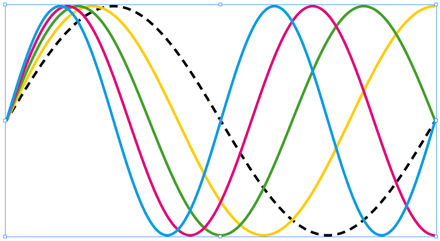
Computing Bézier curves that really look like sine waves is an exciting challenge for script developers. One needs to deal with both optimizing control points, transforming coordinate spaces and splitting curves. Here is a function that solves it all in ExtendScript for InDesign…
De la migration typographique des appels de note [MÀJ]
March 20, 2021 | Snippets | fr
Affairé à délester mes répertoires de vieux scripts InDesign antédiluviens, je tombe sur un petit utilitaire qui me semble encore digne d'emploi chez les orthotypographes. Sa mission ? Repositionner les appels de note avant toute ponctuation fermante, comme l'exige la tradition…
InstantUnicode | Insert Characters by Typing their Codepoint
March 12, 2020 | Snippets | en | fr
Many fonts offer a wide range of Unicode characters. Does your text require a 'Ű'? Minion Pro has it. Go to U+0170 LATIN CAPITAL LETTER U WITH DOUBLE ACUTE. Or do you need an umbrella glyph? Segoe UI Emoji supports U+2602… Of course you can access any element from the Glyphs panel, but when you already know the codepoint to be rendered, why not just ask InDesign to parse the code you've just entered?…

InstantVariable | Quickly Edit your InDesign Variables
August 23, 2019 | Snippets | en | fr

Some InDesign documents rely on a set of user-defined text variables that expect to be updated on every new project. Think about that ISBN number which appears at different places and must be edited consistently. Variables are great, but InDesign makes them painful to handle. Hence the present script, which automatically opens an edit box whenever a variable is selected…
InDesign Scripting Forum Roundup #13
June 06, 2019 | Snippets | en
Here are nine useful InDesign scripts extracted from one year of debate in the scripting branch of forums.adobe.com. There are snippets for every taste—text, layout, graphics, geometry, UI—so take a look!

FillBleed | Fix Image Frames so they Meet the Bleed Edge [Update]
July 11, 2018 | Snippets | en | fr
InDesign Scripting Forum Roundup #12
June 11, 2018 | Snippets | en
Hey scripters, are you familiar with InDesign events, event listeners, menu actions, idle tasks? That's the hot focus of the 12th ISFR. Plus a fine selection of threads and snippets involving GREP, text, CMYK swatches, IDML, transformations… Enjoy the ride!

How to Shuffle Characters the Right Way
January 15, 2018 | Snippets | en | fr
While fine-tuning a layout you usually need to put some dummy text in your template. The common way to fill a frame with lorem-ipsum-like data is to call Type > Fill with Placeholder Text. But sometimes you already have an actual text in place, and then your missing feature is the ability to scramble existing characters. Thanks to IdExtenso we can write a nice and fast scrambler, based on Markov chains…
InDesign Scripting Forum Roundup #11
September 16, 2017 | Snippets | en
What's on the menu for this 11th episode? My personal selection of the most interesting, verbose, and technical discoveries that took place in the InDesign Scripting Forum within the last eight months. Each topic (and code snippet!) will teach you something you probably didn't even suspect…

« previous entries - Page 1 of 3

