Show Local Formatting in InDesign CS4/CS5
May 10, 2010 | Snippets | en | fr
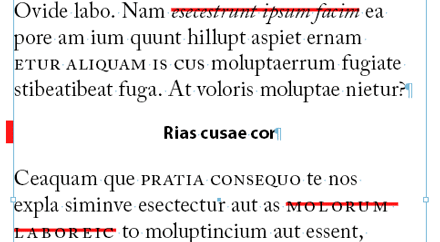
The Document Object Model of the InDesign CS4 scripting layer provides an obscure property, TextPreference.enableStylePreviewMode, which allows to show “style overrides” as red strikeouts or paragraph vertical bars in normal screen mode (as illustrated above). After hours of investigation, I have not figured out how to access this feature from the InDesign user interface. Maybe I'm wrong, but it looks like this way of reporting local formatting is only available through scripting. (Please add a comment if I missed the obvious!)
Anyway this is a great feature. Usually we detect an override by selecting a target text range and checking the style name in the Paragraph Styles and/or Character Styles panel(s). A plus sign (+) next to the style name indicates that a local formatting overrides the style's attributes. (See “Override character and paragraph styles” in the InDesign online help.) But that approach is useless if you need a global overview of the style gaps after importing from Word, or similar operations.
(Note: you can define a Preflight Profile to report style overrides.)
Now to the script
ShowHideLocalFormatting.js is the shortest script I've ever written. It simply toggles between the normal view mode and our special “display style overrides” mode:
if (
  app.documents.length &&
  app.activeDocument.textPreferences.enableStylePreviewMode^= 1 &&
  app.layoutWindows.length &&
  app.activeWindow.constructor==LayoutWindow
  )
  {
  app.activeWindow.screenMode = ScreenModeOptions.previewOff;
  // UPDATE 05/25/10 - Thanks to ptruskier
  app.activeWindow.overprintPreview = false;
  }
The above code contains extra stuff to prevent the script from contextual errors, anyway the only important instruction is:
app.activeDocument.textPreferences.enableStylePreviewMode^= 1;
which switches the enableStylePreviewMode flag.
Here is a typical result:

If it turns out that this display feature is not available natively in InDesign CS4, I strongly encourage you to attach a keyboard shortcut to the script!
• See also: The Hidden Way to Highlight Styles


Comments
Bonjour Marc,
Il est "marrant" ce script ! En tout cas, je le vois déjà parmi mes scripts utilisés au quotidien.
Bref "Un petit script pour Marc, un grand pas pour les indesigners" !
Merci
Merci Laurent.
Le plus étonnant de l'histoire, c'est qu'apparemment on ne trouve pas ce truc directement dans ID ! (Mais j'attends les autres commentaires pour confirmer.) La seule chose dont je sois sûr, c'est que l'attribut utilisé dans mon script n'existait pas avant CS4.
@+
Marc
Pas mal du tout !!!!!
Ben alors, mes commentaires se barrent maintenant ! J'ai pas dû appuyer sur envoyer :-\
Bref, je disais bravo pour le script, son utilité, la concision de l'écriture et la belle exploration du DOM.
Je te questionnais aussi sur la signification du ^= .
A+ Loic
Merci à tous deux.
@Loic
Le ^ (accent circonflexe) correspond à l'opérateur XOR. Quand tu fais un "XOR 1" sur un booléen, en JavaScript, cela commute la valeur. Plus exactement, JS transtype TRUE en 1 (ou FALSE en 0) et fait l'opération, c-à-d que l'on a respectivement :
TRUE ^ 1 === 0
FALSE ^ 1 === 1
Ensuite, l'écriture ^= est un code condensé qui fonctionne de la même façon que +=. Autrement dit, une instruction de la forme :
X ^= Y;
signifie:
X = X ^ Y;
Par conséquent, si B est un booléen, le code :
B ^= 1;
revient à affecter à B son complémentaire logique exprimé sous la forme 0 ou 1.
Par chance, la propriété "enableStylePreviewMode" que j'ai besoin de switcher accepte de recevoir 0 ou 1 (en lieu de FALSE ou TRUE), donc l'opération :
(...).enableStylePreviewMode ^= 1;
inverse effectivement la valeur de la propriété.
Pourquoi un détour si compliqué ? Pour éviter d'écrire :
(...).enableStylePreviewMode = !(...).enableStylePreviewMode;
ce qui solliciterait deux fois le DOM en parcourant à deux reprises la chaîne prototypée app.activeDocument.textPreferences.enableStylePreviewMode.
Il faut garder à l'esprit que chaque fois qu'on navigue dans le proto d'un objet, on perd du temps. Accessoirement, l'écriture obtenue est beaucoup plus compacte, sans réclamer l'introduction d'une variable.
@+
Marc
what a lovely Script Marc!
I have just tested it in CS5 as well, and it seems to work OK in that version too.
I've added a blog-post to my website about your script. Thank you so much for another great script!
Je te remercie Marc pour l'explication.
Mes collègues ingénieurs m'ont expliqué cela aussi :-)
Deux fois, Marc, pas deux foix :-)
C'est la seule chose que je pige dans tes explications… cela ne va pas loin, je te le concède :-)
@ Cari
Thanks a lot, this is good news for CS5 users. The link: carijansen.com/2010/05/10/style-overrides-script-indesign-cs4
@ Jean-Christophe
> C'est la seule chose que je pige dans tes explications [...]
Ouix! Maix qu'est-ce que je feraix sans ton oeil de lynx? (Coquille corrigée, merci.)
Très pratique au quotidien.
Merci pour ce script.
Marc,
Nice discovery. It's not unusual for script methods or properties not to have a UI equivalent. There are even keyboard shortcuts that don't have menu entries: recompose all stories (Ctrl+Alt+/) close all documents (Shift+Ctrl+Alt+W), save all documents (Shift+Ctrl+Alt+S), and probably some more.
Thanks also for the ^ exposé -- didn't know about that one and it looks very useful.
Peter
Wow! Awesome script. Just what I need! Thank you so much!
Thanks all.
@Peter
Wow, cool shortcuts! I never knew you could close all documents with the keyboard.
> It's not unusual for script methods or properties
> not to have a UI equivalent.
Yes. In this chapter we also could mention the “InDesign script for Balance Ragged Lines” by Keith Gilbert.
I would like to make a compilation of these "under the hood" features...
And all the right-to-left stuff of course.
>I would like to make a compilation of these "under the hood" features...
Don't let anybody stop you ;)
@Marc: very cool!
One additional feature "under the hood": different column gap widths on one single page by manipulating the marginPreferences.columnsPositions-array.
Thanks! This is a terrific finding. I only wish it also worked in CS3. Note that in addition to turning preview mode off, you must also ensure that Overprint Preview is turned off.
Hi Mark how are you doing?
It is a very useful script thanks a lot.
I'll mention it in my blog, if you don't mind?
@ ptruskier
> you must also ensure that Overprint Preview
> is turned off.
You are perfectly right! I've updated the code. Thanks for your comment.
@ Mohammed
> I'll mention it in my blog...
Thank you too ;-)
Direct link to the thread: indesignyat.webatu.com/?p=209 (AR)
very cool finding!
maybe there is no ui equivalent because of some bugs in the feature? probably only adobe knows.
anyway my first testing worked perfect.
Marc,
Here is another unknown feature: watermarks:
https://www.indesign-faq.de/wasserzeichen-in-indesign/
Peter
Salut Marc
très pratique en effet,
Peux-tu dire si il est possible de changer la couleur de biffure que ton script active ? ou est-ce encore un mystère des ingénieur d'Adobe ?
++
Pas possible à ma connaissance. Les voies de l'ingénieur (Adobe) sont impénétrables ;-)
Thank you so much.
it´s just the one I was looking for.
works perfect in CS5
Wow. Great. Love it. Cheers! :)
Hi Marc! You saved me! I frequently do large InDesign reports where the text comes from Word that has been edited by many authors. After I've placed and cleaned the Word text, *some* overrides always get through. Today, spot-checking a 150-page document took me 10 minutes! THANK YOU!!! =)
thanks, mate.
saved my work-days-to-come.
=)
@ all
Thanks for your feedback!
@ Marisa
You're welcome. (My greetings to McKinsey's team.)
I just came across this while searching for something else - this is going to be SO useful for a massive book project I'm working on, with many many different authors working in Word. Just had to add my thanks!
Thanks for your thanks ;-)
@+
Marc
Dear Marc,
Great script.
If I want to view only the local formatting on character styles; is it possible? please give your advise
regards
Hi pals,
> If I want to view only the local formatting on
> character styles; is it possible?
Sorry, I really don't know. As the Style Preview Mode sounds like an hidden gem, I've no idea on how we could tweak that feature.
@+
Marc
Merci.
Trés bon pour assurer avant d'exporter pour ePub!
Super !
En même temps je passe mon temps à adapter ma mise en forme locale afin de faire correspondre le texte à ma maquette. Par contre les styles d'objets sont moins amenés à subir des modifications.
Peut-on imaginer une petite variante pour les styles d'objets ?
@victor
> En même temps je passe mon temps à adapter ma mise en forme
> locale afin de faire correspondre le texte à ma maquette (...)
À mon humble avis, lorsque des interventions locales « homogènes » deviennent récurrentes, c'est exactement le moment de leur associer un style de caractères ad hoc. Par exemple, si vous appliquez régulièrement l'italique au fil de la composition, il est préférable de créer le style correspondant. Idem pour l'application locale d'une nuance. L'idée, c'est que toute intervention considérée comme NORMALE sur les attributs du texte corresponde à un style.
Inversement, un ajustement « clinique » — par exemple l'étroitisation infime du caractère pour gagner une ligne en justification — mérite selon moi de rester détectable. La fonction du script est précisément de rendre visible ce type d'ajustement, en particulier lorsque vous avez besoin de les neutraliser pour certains types d'export, etc.
> Peut-on imaginer une petite variante pour les styles d'objets ?
Ce serait appréciable, mais comme je l'ai précisé le script repose sur une fonction cachée qui n'est aucunement malléable. Je vois aucun moyen de l'extrapoler aux styles d'objets, hélas !
Merci pour votre réponse.
Evidemment que j'utilise des styles de caractères...
Je comprends qu'il puisse être intéressant de savoir ce qui normale ou non, mais cela peut être intéressant aussi d'indiquer lorsque le style repose sur aucun style ou sur un style non désiré ([Paragraphe standard] par exemple).
Je vous dit cela parce que j'ai bien une police par défaut en général, des textes importés dont l'apparence peut ressembler à celui de mes styles, des travaux que je reprends etc.
Cela permettrait de savoir cette fois où nous en sommes dans notre travail d'application de styles de texte sur les pages.
Pour les styles d'objets, tant pis... A ce propos, je me posais une question : y' a t'il une possibilité, comme on le fait avec le texte, de rechercher/supprimer des objets ?
Thanks a lot!
Your script does exactly what I hoped it to do.
Perfect job.
Hi Guys,
I saw this script and realised it was very close to what I was working on. I have written an InDesign CS5 Mac plugin to do just this, and little bit more.
If there is enough interest I could make this work in CS3.
Best.
Hi Rich,
Your StyleOverridesID plugin sounds to feature interesting enhancements, thanks!
I think a CS3 version would be appreciated —since my ShowHideLocalFormatting script does not support CS3.
Note. — StyleOverridesID was produced by Kerntiff:
https://www.kerntiff.co.uk/
@+
Marc
This does exactly what I was looking for, but is there a way to print or PDF the result? I ned to be able to show these overrides to the designer who is sending me the files.
When I print or PDF from this, the red lines disappear.
Hi Gavin,
> is there a way to print or PDF the result?
I don't think it's possible, but indeed I'd love to have that feature too.
@+
Marc
Great to see this script also works in InDesign CS5.5 Marc! I'm going to use it tonight at InDesign User Group meeting in Perth ;-) teaching people all about paragraph/character styles ;-)
Hi Cari,
> Great to see this script also works in InDesign CS5.5.
I had no doubt on this ;-)
What is strange is the fact that Adobe engineers didn't make this feature available yet from the user interface!
@+
Marc
ha, yeah, I was talking about that last night at the IDUG when I showed people how the script worked... I was thinking this on/off feature must be in the application somewhere... but maybe not yet fully developed ;) and only a smart scripter discovered it and opened it up to the world with his script :)
Hi Marc,
thanks a lot for the wonderful script.
Do you know any possibility how a script can "see" the red marked paragraphs or characters?
All the best
J.