InDesign Scripting Forum Roundup #1 (25 sticky posts)
March 07, 2011 | Snippets | en
The InDesign Scripting Forum is an ideal place to post scripting recipes and to address technical issues. I learn a lot from its famous contributors — Dave Saunders, Harbs, Jongware, Peter Kahrel, Kasyan Servetsky, Marijan Tompa… At odd times I post my own brainchilds. Here is a small selection of snippets and topics that I think are worthwhile.
1/ Dealing with Page Items
Adding Items within a Group
Retrieving “Exclusive” Spread Items
Page and PageItems: the getPage case
Drawing a Rounded Corner
2/ Text, Contents, Fonts
Font Replacement Routine
Fit Text Frame to Content (supporting multicolumn)
Paragraph Selection
Dealing with InDesign's SpecialCharacters
3/ Useful Algorithms
Removing Duplicates from an Array of Strings
Polygon Collision
Formatting Numbers and Ranges
4/ ScriptUI Stuff
Get Swatches in DropDownList with Color Preview
Using the ‘mouseout’ Event in a Palette
5/ Miscellaneous
Open an URL in the Default Browser
Processing XMP Data through the XMPScript API
Open a TextFrame in Text-Edit mode
Setting an XML Attribute from a Variable
Escaping Characters in RegExp
6/ Bugs, issues and workarounds
Attempt to Bypass the ‘FastEntireScript Bug’
ScriptUI Window.children Memory Leak (CS4)
UnitValue Bug
CS3 Closure Bug
CS4 Bug with RegExp Negated Character Class
Avoiding Global Variables
Preventing Memory Leak in a Closure
1/ Dealing with Page Items
Adding Items within a Group
A complicated solution to a simple problem:
Group.prototype.addItems = function(/*PageItem[]*/ newItems)
//----------------------------
// Emulates Group.groups.add(items)
// [ Also supports Group.addItems(existing_item) ]
// <newItems> == Array of 2+ PageItem
//   -> create a <newItems> subgroup in <this>
// <newItems> == single PageItem
//   -> add the PageItem in <this>
// Returns the added subgroup or item
// (the whole group hierarchy is preserved)
// Note - this method fails if <this> is
//        anchored/embedded in a story
{
var nodes=[], gs=[], g=this, node;

var makeNode = function(id,g)
    {
    var elems = g.pageItems.everyItem().getElements();
    if (id === null) // placeholder for newItems
        return {index: elems.length, items:elems.concat(0)};
    for(var i=elems.length-1 ; i>=0 ; i--)
        // need to find the actual index in the group
        if (elems[i].id == id) break;
    return {index: i, items:elems};
    };

var id=null;
for( ; g.constructor == Group ; id=g.id, g=g.parent )
    {
    gs.push(g.getElements()[0]);
    nodes.push(makeNode(id,g));
    }

var add = (function()
    {
    var host = g;
    return function(items)
        {
        return host.groups.add(items);
        };
    })();

var r = ( 'array' == typeof newItems ) ?
    add(newItems) :
    newItems;

while( g=gs.pop() ) g.ungroup();

for( g=r ; node=nodes.shift() ; )
    {
    node.items[node.index] = g;
    g = add(node.items);
    }
return r;
}
• Original post: forums.adobe.com/message/2259499 (no longer available)
Retrieving “Exclusive” Spread Items
This snippet returns the page items of Spreads —excluding those which belong to Pages:
var pItems = app.activeDocument.
    pageItems.everyItem().getElements();

var exclusiveSpreadItems = [];

for( var p, i = pItems.length-1 ; i>=0 ; i-- )
    {
    p = pItems[i].parent.constructor;
    if ( p == Spread || p == MasterSpread )
        exclusiveSpreadItems.push(pItems[i]);
    }

alert( exclusiveSpreadItems );
• Original post: forums.adobe.com/message/2218151 (no longer available)
Page and PageItems: the getPage case
An improved version of getPage().
Page.prototype.intersects = function(/*bounds*/pib)
//----------------------------
// Return TRUE if this page intersects the bounds
// <pib> == [top,left,bottom,right]
{
var b = this.bounds;
return b[0]<=pib[2] && pib[0]<=b[2] &&
    b[1]<=pib[3] && pib[1]<=b[3];
}

TextFrame.prototype.getPage = function()
//----------------------------
// Returns the containing Page of this TextFrame
// [ Works also with grouped/embedded frame ]
{
var p = this.parent,
    b = this.visibleBounds,
    pc, pgs, i;

while( pc=p.constructor )
    {
    if( pc == Page )
        {
        if( p.intersects(b) ) return p;
        pgs = p.parent.pages; // spread pages
        for( i=pgs.length-1 ; i>=0 && p=pgs[i] ; i-- )
            {
            if( p.intersects(b) ) return p;
            }
        pc = Spread;
        }

    if( pc == Spread || pc == MasterSpread )
        throw Error("The textframe is placed on a spread!");

    if( 'parentTextFrames' in p && !(p=p.parentTextFrames[0]) )
        throw Error("The textframe's container overflows!");

    p=p.parent;
    }
}

// Sample code (assumed a text frame is selected)
//----------------------------
var tf = app.selection[0],
    pg;

try {
    pg = tf.getPage();
    alert( "Page: " + pg.name + " Side: " + pg.side);
    }
catch(e)
    {
    alert( e );
    }
• Original post: forums.adobe.com/message/2525480 (no longer available)
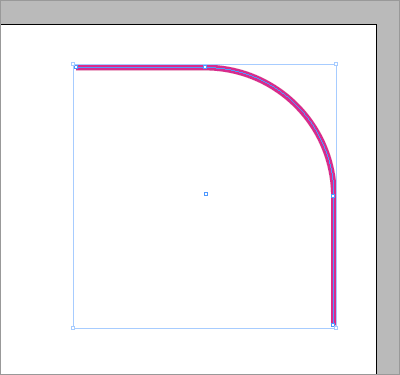
Drawing a Rounded Corner
The below code illustrates a method to change the entirePath of an Oval in order to create a rounded corner.
var pg = app.activeWindow.activePage,
    pb = pg.bounds,
    w = pb[3]-pb[1],
    h = pb[2]-pb[0],
    diag = Math.sqrt(w*w+h*h),
    radius = diag/12.0,
    spacing = radius/3.0;

var t = spacing + 2*radius,
    c, ep;

// Create and position the circle at [top,right]
// ---
(c=pg.ovals.add()).geometricBounds = [
    pb[0]+spacing,
    pb[3]-t,
    pb[0]+t,
    pb[3]-spacing
    ];

// Reduce the path points to a top-right corner
// ---
ep = c.paths[0].entirePath;
ep[0] = [ep[1][1][0], ep[0][1][1]];
ep[1][0] = ep[1][1].concat();
ep[3] = [ep[3][1][0], ep[2][1][1]];
ep[2][2] = ep[2][1].concat();
c.paths[0].properties = {
    entirePath: ep,
    pathType: PathType.OPEN_PATH
    };
• Original post: forums.adobe.com/message/3500409 (no longer available)
2/ Text, Contents, Fonts
Font Replacement Routine
A simple changeMissingFontsBy method (tested in InDesign CS4):
Document.prototype.
changeMissingFontsBy = function(/*str|Font*/fontOrFontName)
//----------------------------
{
var asFont = function(/*var*/f)
    {
    if( !f ) return null;
    if( 'string' == typeof f ) f = app.fonts.item(f);
    if( f.constructor != Font ) return null;
    return f;
    };

var missing = function(/*Font*/f)
    {
    return f.status != FontStatus.INSTALLED;
    };

var substFont = asFont(fontOrFontName);
if( (!substFont) || missing(substFont) )
    {
    alert( "["+ fontOrFontName + "] not installed!" );
    return;
    }

var changeMissingFont = function(obj)
    { // <obj> == any object w/ appliedFont prop
    var f = asFont(obj.appliedFont);
    if( !f || !missing(f) ) return;

    try{obj.appliedFont = substFont;}
    catch(_){}
    };

var scope = this.allCharacterStyles
    .concat(this.allParagraphStyles)
    .concat(this.stories.everyItem().
        textStyleRanges.everyItem().getElements());

var s;
while( s=scope.shift() ) changeMissingFont(s);
}

// test
app.activeDocument.changeMissingFontsBy("Times New Roman");
• Original post: forums.adobe.com/message/2250103 (no longer available)
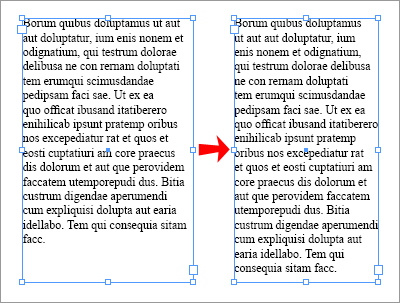
Fit Text Frame to Content (supporting multicolumn)
CS4/CS5 fitHorizontal script —based on an dichotomous algorithm:
// Your Settings:
var X_PRECISION = .1;     // pts

// Some constants
var INNER = CoordinateSpaces.
        INNER_COORDINATES,
    MULTIPLY = ResizeMethods.
        MULTIPLYING_CURRENT_DIMENSIONS_BY,
    ADDTO = ResizeMethods.
        ADDING_CURRENT_DIMENSIONS_TO,
    AP_LEFT = AnchorPoint.
        TOP_LEFT_ANCHOR,
    AP_RIGHT = AnchorPoint.
        TOP_RIGHT_ANCHOR;

function fitHorizontal(/*TextFrame*/ tf, /*str*/xRef)
//----------------------------
// Fits a textframe width to its content
// i.e. adjusts the frame width to the optimal value
//      w/o changing the height
// <xRef> (opt.): reference pt
//                'left'(def.) | 'right' | 'center'
// * If needed, you must perform first a vertical fit
//   i.e.: tf.fit(FitOptions.FRAME_TO_CONTENT)
// * This routine supports rotated text frame
// * Also, unlike the InDesign UI, this routine
//   supports *multicolumn* TF
//----------------------------
{
    // Default width multiplier. This value is only
    // used if tf overflows in its initial state.
    // 1.5 is fine, usually.
    var X_FACTOR = 1.5;

    var ovf = tf.overflows,
        dx;

    xRef = AnchorPoint['TOP_' +
        (xRef||'left').toUpperCase() +
        '_ANCHOR'];

    // If tf originally overflows, we need to
    // increase the width
    while( tf.overflows )
        tf.resize(INNER,xRef,MULTIPLY,[X_FACTOR,1]);

    // Now, let's compute the maximal
    // width variation (dx)
    dx = tf.resolve(AP_RIGHT, INNER)[0][0]-
        tf.resolve(AP_LEFT, INNER)[0][0];
    if( ovf ) dx *= (1-1/X_FACTOR);

    // Dichotomy on dx
    while( dx > X_PRECISION )
        {
        dx*=.5;
        tf.resize(INNER,xRef,ADDTO,
            [dx*(tf.overflows?1:-1),0]);
        }

    // Last step, if needed
    if( tf.overflows )
        tf.resize(INNER,xRef,ADDTO,[dx,0]);
}

// Sample code
//----------------------------

// Assuming the user has selected a text frame
var tf = app.selection[0];

// Vertical fit (if you want it 1st --not needed)
// tf.fit(FitOptions.FRAME_TO_CONTENT);

// Horizontal fit (from the left edge)
fitHorizontal(tf, 'left');
• Original post: forums.adobe.com/message/3387054 (no longer available)
Paragraph Selection
Selecting paragraph(s), with or without end mark(s):
function selectParagraph(/*Paragraph*/par,
 /*?bool*/includingEndmark)
//----------------------------
// Returns FALSE if the target is invalid,
//  (otherwise returns TRUE)
// * Supports single Paragraph, or Paragraph
//   range, or everyItem()
// * If the target is empty (no character),
//   move the insertion pt within
{
var p, ips, c = -1;

try {
    p=resolve(par.toSpecifier());
    if( p && p.constructor == Array )
        // converts everyItem into a range
        p=p[0].parent.paragraphs.itemByRange(0,-1);
    ips = p.insertionPoints;
    }
catch(_){}

if( !ips ) return false;  // invalid specif.

if( !includingEndmark )
    c -= ((c=p.characters) &&
        c.length && c[-1].contents=='\r');

ips.itemByRange(0,c).select();
return true;
}

// Sample tests
//----------------------------
var pars = app.activeDocument.
    stories[0].paragraphs;

// Single paragraph
//----------------------------
if( selectParagraph(pars[1]) )
    alert( "Selection of the 2nd paragraph " +
        "EXCLUDING end mark" );
else
    alert( "Unable to select the 2nd paragraph" );

if( selectParagraph(pars[1], true) )
    alert( "Selection of the 2nd paragraph " +
        "INCLUDING end mark" );
else
    alert( "Unable to select the 2nd paragraph" );

// Paragraph range
//----------------------------
if( selectParagraph(pars.itemByRange(1,2), true) )
    alert( "Selection of paragraph range [1,2] " +
        "INCLUDING end mark" );
else
    alert( "Unable to select the " +
        "paragraph range [1,2]" );

if( selectParagraph(pars.itemByRange(1,2)) )
    alert( "Selection of paragraph range [1,2] " +
        "EXCLUDING end mark" );
else
    alert( "Unable to select the " +
        "paragraph range [1,2]" );

// everyItem() support -- equiv. to itemByRange(0,-1)
//----------------------------
if( selectParagraph(pars.everyItem()) )
    alert( "Selection of every paragraph " +
        "EXCLUDING end mark" );
else
    alert( "Unable to select every paragraph" );

if( selectParagraph(pars.everyItem(), true) )
    alert( "Selection of every paragraph " +
        "INCLUDING end mark" );
else
    alert( "Unable to select every paragraph" );
• Original post: forums.adobe.com/message/2993426 (no longer available)
Dealing with InDesign's SpecialCharacters
Precisions about SpecialCharacters cast and conversion issues:
• forums.adobe.com/message/3381674 (no longer available)
• See also: About Special Characters Code Points and Enumeration
3/ Useful Algorithms
Removing Duplicates from an Array of Strings
The “Hash Sieving” method is in O(2n):
function unique(/*str[]*/ arr)
{
    var o={},
        r=[],
        n = arr.length,
        i;

    for( i=0 ; i<n ; ++i )
        o[arr[i]] = null;

    for( i in o )
        r.push(i);

    o = null;
    return r;
}

// TEST:
alert( unique(["a","b","c","c","a","d","b","b"]) );
// => a, b, c, d
• Original post: forums.adobe.com/message/3288743 (no longer available)
Polygon Collision
Two functions that help you to detect whether two shapes intersect:
Polygon.prototype.
 collideBounds = function(/*Polygon*/ _poly)
//----------------------------
// Ret. TRUE if the bounding boxes intersect,
//  otherwise return FALSE
// Note - Fast method, but TRUE does not mean that
//        the inner shapes actually intersect
{
var b = this.visibleBounds;
var _b = _poly.visibleBounds;
return( !((b[0]>_b[2]) || (b[2]<_b[0]) ||
    (b[1]>_b[3]) || (b[3]<_b[1])) );
}

Polygon.prototype.
 collideShapes = function(/*Polygon*/ _poly)
//----------------------------
// Ret. TRUE if the shapes actually intersect
// (Slow!)
{
try {
    this.intersectPath(_poly);
    app.activeDocument.undo();
    return(true);
    }
catch(_){ return(false); }
}
• Original post: forums.adobe.com/message/2385700 (no longer available)
Formatting Numbers and Ranges
With the help of Peter Kahrel:
function formatRanges(numbers, separator,
    joiner, minWidth, tolerance)
//----------------------------
// Formats an array of integers into an ordered
// sequence of single numbers and/or ranges.
// Returns the formatted string.
//
// <numbers>
//      Array of Numbers [required]
//      The integers to format. Supports: empty
//      array, unsorted array, duplicated elems,
//      negative values.
// <separator>
//      String [opt] -- Default value: ", "
//      A string inserted between each result.
//      Ex.: formatRanges([4,1,3,8,9,6], " | ")
//          => "1 | 3-4 | 6 | 8-9"
// <joiner>
//      String [opt] -- Default value: "-"
//      A string used to format a range.
//      Ex.: formatRanges([4,1,3,8,9,6], ", ", "_")
//          => "1, 3_4, 6, 8_9"
// <minWidth>
//      Number [opt] -- Default value: 1
//      Minimum distance between the 1st and the
//      last number in a range.
//      Ex.: formatRanges([1,2,4,5,6,8,9,10,11], '', '', 1)
//          => "1-2, 4-6, 8-11"
//      Ex.: formatRanges([1,2,4,5,6,8,9,10,11], '', '', 2)
//          => "1, 2, 4-6, 8-11"
//      Ex.: formatRanges([1,2,4,5,6,8,9,10,11], '', '', 3)
//          => "1, 2, 4, 5, 6, 8-11"
// <tolerance>
//      Number [opt] -- Default value: 0
//      Number of allowed missing numbers in a range,
//      as suggested by Peter Kahrel
//      Ex.: formatRanges([2,3,5,8,12,17,23], '', '', 1, 0)
//          => "2-3, 5, 8, 12, 17, 23"
//      Ex.: formatRanges([2,3,5,8,12,17,23], '', '', 1, 1)
//          => "2-5, 8, 12, 17, 23"
//      Ex.: formatRanges([2,3,5,8,12,17,23], '', '', 1, 2)
//          => "2-8, 12, 17, 23"
{
    // Defaults
    // ---
    separator = separator || ", ";
    joiner = joiner || "-";
    if( minWidth !== ~~minWidth || minWidth < 1 )
        minWidth = 1;
    if( tolerance !== ~~tolerance || ++tolerance < 1 )
        tolerance = 1;

    // Init.
    // ---
    var a = numbers.concat().
            sort(function(x,y){return x-y;}),
        sz = a.length,
        n = sz && a[0],
        d = sz || false,
        i = 0, w = 0, t = 0,
        ret = [];

    // Loop
    // ---
    while( d !== false )
    {
    if( 0 === (d=(++i<sz)?a[i]-n:false) )
        continue;    // skip duplicates

    if( d && (d<=tolerance) )
        {
        ret.push(n);
        n += d;
        ++w;
        t += (d-1);
        continue;
        }

    if( w >= minWidth )
        {
        ret.length -= w;
        ret.push((n-w-t)+joiner+n);
        }
    else
        {
        ret.push(n);
        }
    n += d;
    w = t = 0;
    }

return ret.join(separator);
}
Update [14-Oct-2013]. — There is a very slight issue in the above routine, in that
formatRanges( [10,12,14], '', '', /*width*/3, /*tolerance*/1 )
returns "10, 12, 14" while we could expect "10-14" with respect to the width parameter.
• Original code: forums.adobe.com/message/3145480 (no longer available)
4/ ScriptUI Stuff
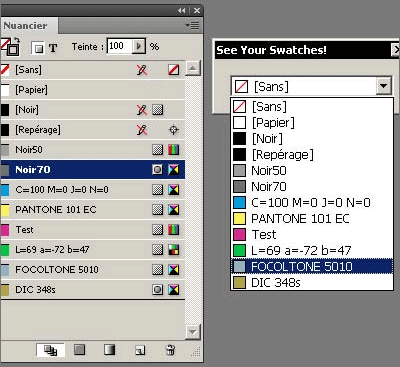
Get Swatches in DropDownList with Color Preview
Shows the document's Swatches in ScriptUI:
// PNG-String Generator (=> 13X13 pixels)
//----------------------------
var pngSwatch = (function()
{
    // Table of CRCs of 8-bit messages
    var CRC_256 = [0, 0x77073096, 0xee0e612c, 0x990951ba, 0x76dc419, 0x706af48f, 0xe963a535, 0x9e6495a3, 0xedb8832, 0x79dcb8a4, 0xe0d5e91e, 0x97d2d988, 0x9b64c2b, 0x7eb17cbd, 0xe7b82d07, 0x90bf1d91, 0x1db71064, 0x6ab020f2, 0xf3b97148, 0x84be41de, 0x1adad47d, 0x6ddde4eb, 0xf4d4b551, 0x83d385c7, 0x136c9856, 0x646ba8c0, 0xfd62f97a, 0x8a65c9ec, 0x14015c4f, 0x63066cd9, 0xfa0f3d63, 0x8d080df5, 0x3b6e20c8, 0x4c69105e, 0xd56041e4, 0xa2677172, 0x3c03e4d1, 0x4b04d447, 0xd20d85fd, 0xa50ab56b, 0x35b5a8fa, 0x42b2986c, 0xdbbbc9d6, 0xacbcf940, 0x32d86ce3, 0x45df5c75, 0xdcd60dcf, 0xabd13d59, 0x26d930ac, 0x51de003a, 0xc8d75180, 0xbfd06116, 0x21b4f4b5, 0x56b3c423, 0xcfba9599, 0xb8bda50f, 0x2802b89e, 0x5f058808, 0xc60cd9b2, 0xb10be924, 0x2f6f7c87, 0x58684c11, 0xc1611dab, 0xb6662d3d, 0x76dc4190, 0x1db7106, 0x98d220bc, 0xefd5102a, 0x71b18589, 0x6b6b51f, 0x9fbfe4a5, 0xe8b8d433, 0x7807c9a2, 0xf00f934, 0x9609a88e, 0xe10e9818, 0x7f6a0dbb, 0x86d3d2d, 0x91646c97, 0xe6635c01, 0x6b6b51f4, 0x1c6c6162, 0x856530d8, 0xf262004e, 0x6c0695ed, 0x1b01a57b, 0x8208f4c1, 0xf50fc457, 0x65b0d9c6, 0x12b7e950, 0x8bbeb8ea, 0xfcb9887c, 0x62dd1ddf, 0x15da2d49, 0x8cd37cf3, 0xfbd44c65, 0x4db26158, 0x3ab551ce, 0xa3bc0074, 0xd4bb30e2, 0x4adfa541, 0x3dd895d7, 0xa4d1c46d, 0xd3d6f4fb, 0x4369e96a, 0x346ed9fc, 0xad678846, 0xda60b8d0, 0x44042d73, 0x33031de5, 0xaa0a4c5f, 0xdd0d7cc9, 0x5005713c, 0x270241aa, 0xbe0b1010, 0xc90c2086, 0x5768b525, 0x206f85b3, 0xb966d409, 0xce61e49f, 0x5edef90e, 0x29d9c998, 0xb0d09822, 0xc7d7a8b4, 0x59b33d17, 0x2eb40d81, 0xb7bd5c3b, 0xc0ba6cad, 0xedb88320, 0x9abfb3b6, 0x3b6e20c, 0x74b1d29a, 0xead54739, 0x9dd277af, 0x4db2615, 0x73dc1683, 0xe3630b12, 0x94643b84, 0xd6d6a3e, 0x7a6a5aa8, 0xe40ecf0b, 0x9309ff9d, 0xa00ae27, 0x7d079eb1, 0xf00f9344, 0x8708a3d2, 0x1e01f268, 0x6906c2fe, 0xf762575d, 0x806567cb, 0x196c3671, 0x6e6b06e7, 0xfed41b76, 0x89d32be0, 0x10da7a5a, 0x67dd4acc, 0xf9b9df6f, 0x8ebeeff9, 0x17b7be43, 0x60b08ed5, 0xd6d6a3e8, 0xa1d1937e, 0x38d8c2c4, 0x4fdff252, 0xd1bb67f1, 0xa6bc5767, 0x3fb506dd, 0x48b2364b, 0xd80d2bda, 0xaf0a1b4c, 0x36034af6, 0x41047a60, 0xdf60efc3, 0xa867df55, 0x316e8eef, 0x4669be79, 0xcb61b38c, 0xbc66831a, 0x256fd2a0, 0x5268e236, 0xcc0c7795, 0xbb0b4703, 0x220216b9, 0x5505262f, 0xc5ba3bbe, 0xb2bd0b28, 0x2bb45a92, 0x5cb36a04, 0xc2d7ffa7, 0xb5d0cf31, 0x2cd99e8b, 0x5bdeae1d, 0x9b64c2b0, 0xec63f226, 0x756aa39c, 0x26d930a, 0x9c0906a9, 0xeb0e363f, 0x72076785, 0x5005713, 0x95bf4a82, 0xe2b87a14, 0x7bb12bae, 0xcb61b38, 0x92d28e9b, 0xe5d5be0d, 0x7cdcefb7, 0xbdbdf21, 0x86d3d2d4, 0xf1d4e242, 0x68ddb3f8, 0x1fda836e, 0x81be16cd, 0xf6b9265b, 0x6fb077e1, 0x18b74777, 0x88085ae6, 0xff0f6a70, 0x66063bca, 0x11010b5c, 0x8f659eff, 0xf862ae69, 0x616bffd3, 0x166ccf45, 0xa00ae278, 0xd70dd2ee, 0x4e048354, 0x3903b3c2, 0xa7672661, 0xd06016f7, 0x4969474d, 0x3e6e77db, 0xaed16a4a, 0xd9d65adc, 0x40df0b66, 0x37d83bf0, 0xa9bcae53, 0xdebb9ec5, 0x47b2cf7f, 0x30b5ffe9, 0xbdbdf21c, 0xcabac28a, 0x53b39330, 0x24b4a3a6, 0xbad03605, 0xcdd70693, 0x54de5729, 0x23d967bf, 0xb3667a2e, 0xc4614ab8, 0x5d681b02, 0x2a6f2b94, 0xb40bbe37, 0xc30c8ea1, 0x5a05df1b, 0x2d02ef8d];

    // PNG Cyclic Redundancy Code algorithm
    // http://www.w3.org/TR/PNG/#D-CRCAppendix
    var crc32 = function(/*uint[]*/buf)
        {
        var c = 0xffffffff >>> 0,
            n = buf.length >>> 0,
            i;
        for( i=0 ; i < n ; ++i )
            c = CRC_256[( ( c>>>0 ) ^ buf[i]) & 0xff] ^ (c >>> 8);

        return (c ^ 0xffffffff)>>>0;
        };

    var PNG_PROLOG = "\x89PNG\r\n\x1A\n\x00\x00\x00\rIHDR\x00\x00\x00\r\x00\x00\x00\r\b\x03\x00\x00\x00E5\x14N\x00\x00\x00\x06",
        PNG_EPILOG = "\x00\x00\x00\x16IDATx\xDAb`D\x06\f\x8C\f\b0\xC8x\xC8\x00 \xC0\x00\x11\xC6\x001{U\x93\xB6\x00\x00\x00\x00IEND\xAEB`\x82";

    return function(/*uint[3]*/rgb)
        {
        var buf = [0x50,0x4C,0x54,0x45, rgb[0], rgb[1], rgb[2], 0, 0, 0],
            crc = crc32(buf),
            i, r;

        buf = buf.concat([ (crc>>>24)&0xFF, (crc>>>16)&0xFF, (crc>>>8)&0xFF, (crc>>>0)&0xFF ]);
        i = buf.length;
        while( i-- )
            buf[i] = String.fromCharCode(buf[i]);

        r = PNG_PROLOG + buf.join('') + PNG_EPILOG;

        buf.length = 0;
        buf = null;
        return r;
        };
})();

var PNG_NONE = "\x89PNG\r\n\x1A\n\x00\x00\x00\rIHDR\x00\x00\x00\r\x00\x00\x00\r\b\x03\x00\x00\x00E5\x14N\x00\x00\x00\fPLTE\xFF\xFF\xFF\x00\x00\x00\xFF\xBC\xBC\xFF\x00\x00 C\x89[\x00\x00\x002IDATx\xDAL\xC7\xC9\x01\x000\b\x020\xD4\xFDwn\xF1\xC2\xFC\x02\xBB`\x18\x1Eg\x1E\xAE\xFD`\xC7\xEC2\xB3J\xAFS\x9B\xE46\x9C\xC2)\xDC\xF5\x04\x18\x00+\xB9\x00z\xA7\xBDj\x1B\x00\x00\x00\x00IEND\xAEB`\x82";

var localeColor = function(/*str*/name)
{
    return '['+
        app.translateKeyString('$ID/'+name)+
        ']';
};

// Parse the app|doc Swatches
//----------------------------
var RGB = ColorSpace.RGB,
    SPOT = ColorModel.SPOT,
    REGISTRATION = ColorModel.REGISTRATION,
    MIXEDINK = ColorModel.MIXEDINKMODEL;

var target = (app.documents.length&&
        app.activeDocument)||app,
    swatches = target.swatches.
        everyItem().getElements(),
    n = swatches.length,
    color, rgbValues,
    colors = [],
    sp, md, nm,
    i, t;

for( i=n-1 ; i>=0 ; i-- )
    {
    color = swatches[i];

    if( !(color instanceof Color) ) continue;

    color = color.getElements()[0];
    sp = color.space;
    md = color.model;
    nm = color.name;

    if( MIXEDINK==md ) continue;    // TODO


    switch( -(REGISTRATION==md||"Black" == nm) ||
        +(RGB==sp) )
        {
        case -1:
            rgbValues = [0,0,0];
            nm = localeColor(nm);
            break;
        case 1:
            rgbValues = color.colorValue;
            break;
        default:
            // backup the color value
            t = color.colorValue;
            // convert to rgb
            color.space = RGB;
            rgbValues = color.colorValue;
            // revert to the color space
            color.space = sp;
            color.colorValue = t;
        }

    if( nm=="Paper" ) nm = localeColor(nm);

    colors.unshift({
        name:nm,
        png: pngSwatch(rgbValues),
        id:color.id
        });
    }

colors.unshift({
    name:localeColor("None"),
    png: PNG_NONE,
    id:target.swatches.itemByName('None').id
    });

// UI
//----------------------------
var w = new Window("dialog", "See Your Swatches!"),
    ddl = w.add("dropdownlist");
n = colors.length;
for( i=0 ; i < n ; ++i )
    (ddl.add('item', "\xa0"+
        colors[i].name)).image = colors[i].png;
ddl.selection = 0;
w.show();
• Original post: forums.adobe.com/message/3426666 (no longer available)
Using the ‘mouseout’ Event in a Palette
Automatically reactivate the application when the mouse leaves the drawable area of the palette:
#targetengine "mySession"

var pal = new Window("palette", "focustest",
    undefined, {resizeable:true, closeButton:true});

pal.st = pal.add("statictext", undefined,
    "some static text...");

pal.addEventListener('mouseout', leaveTestPalette);

function leaveTestPalette(/*MouseEvent*/mev)
    {
    if( mev.target instanceof Window ) app.activate();
    }

pal.show();
• Original post: forums.adobe.com/message/3462710 (no longer available)
5/ Miscellaneous
Open an URL in the Default Browser
An adaptation of Gerald Singelmann's function:
function openInBrowser(/*str*/ url)
//----------------------------
{
    var isMac = (File.fs == "Macintosh"),
        fName = 'tmp' + (+new Date()) +
            (isMac ? '.webloc' : '.url'),
        fCode = isMac ?
        ('<?xml version="1.0" encoding="UTF-8"?>\r'+
        '<!DOCTYPE plist PUBLIC "-//Apple//DTD PLIST 1.0//EN" '+
        '"http://www.apple.com/DTDs/PropertyList-1.0.dtd">\r'+
        '<plist version="1.0">\r'+
        '<dict>\r'+
            '\t<key>URL</key>\r'+
            '\t<string>%url%</string>\r'+
        '</dict>\r'+
        '</plist>') :
        '[InternetShortcut]\rURL=%url%\r';

    var f = new File(Folder.temp.absoluteURI + '/' + fName);
    if(! f.open('w') ) return false;

    f.write(fCode.replace('%url%',url));
    f.close();
    f.execute();
    $.sleep(500);   // 500 ms timer
    f.remove();
    return true;
}

// Test:
openInBrowser("http://www.indiscripts.com/");
• Original post: forums.adobe.com/message/3180866 (no longer available)
Processing XMP Data through the XMPScript API
Just a sample code:
TextFrame.prototype.getCaption = function()
//----------------------------
// Here you can customize the XMP caption
{
// E.g.:
// return this.contents.replace( /[\n\r]/g , " " );

// Default:
    return this.contents;
}

Document.prototype.getScope = function()
//----------------------------
// return the array of {txf,img} objects to treat
{
    var scope = [], pages = this.pages;
    for ( var pg, p = pages.length-1 ; p >= 0 ; p-- )
        {
        pg = pages[p];
        if ( pg.textFrames.length != 1 )
            continue;
        if ( pg.rectangles.length != 1 )
            continue;
        if ( pg.rectangles[0].images.length != 1 )
            continue;
        scope.push({
            txf: pg.textFrames[0],
            img: pg.rectangles[0].images[0]
            });
        }
    return(scope);
}

Application.prototype.main = function()
//----------------------------
{
if( this.documents.length<=0 )
    {
    alert("Think to open a document!");
    return;
    }

var scope,
    sel = this.selection,
    t;

switch(sel.length)
    {
    case 0 :
        scope = this.activeDocument.getScope();
        break;
    case 2 :
        scope = ( function()
            {
            t = (sel[0].constructor == TextFrame) ?
                0 :
                (
                (sel[1].constructor == TextFrame) ?
                1 :
                false
                );
            if (t===false)
                return null;
            if ( sel[1-t].images.length != 1 )
                return null;
            return [{
                txf: sel[t],
                img: sel[1-t].images[0]
                }];
            } )();
        if (scope) break;
    default :
        alert("One image and one textframe "+
            "must be selected.");
        return;
    }

if( ExternalObject.AdobeXMPScript == undefined )
    {
    try {
        ExternalObject.AdobeXMPScript = new ExternalObject('lib:AdobeXMPScript');
        }
    catch(_)
        {
        alert("Unable to load the AdobeXMPScript library");
        return;
        }
    };

var txfImg, iLink, iFile, xmpFile, xmp;
var err=0, cpt=0;

while (txfImg=scope.pop())
    {
    iLink = txfImg.img.itemLink;
    try {iFile = new File(iLink.filePath);}
    catch(_) {err++;continue;}

    xmpFile = new XMPFile(iFile.fsName,
        XMPConst.UNKNOWN, XMPConst.OPEN_FOR_UPDATE);

    xmp = xmpFile.getXMP();
    xmp.deleteProperty(XMPConst.NS_XMP,
        "Description");
    xmp.setProperty(XMPConst.NS_XMP,
        "Description", txfImg.txf.getCaption());

    if( xmpFile.canPutXMP(xmp) )
        {
        xmpFile.putXMP(xmp);
        cpt++;
        }
    else
        err++;

    xmpFile.closeFile(XMPConst.CLOSE_UPDATE_SAFELY);

    if (iLink.status == LinkStatus.linkOutOfDate)
        iLink.update();
    }

alert(''+cpt+" image descriptions updated -- "+
    err+" errors.");

try{this.activeDocument.save();}
catch(ex){}
}

app.main();
• Original post: forums.adobe.com/message/2225492 (no longer available)
Open a TextFrame in Text-Edit mode
One line code:
// Text Edit Mode:
myTextFrame.parentStory.storyEdit();
• Original post: forums.adobe.com/message/3168140 (no longer available)
Setting an XML Attribute from a Variable
What if you need to set an XML attribute whose name is given in a variable?
var xml = <document><pages><page/></pages></document>;
var att_name = "foo";
xml.page['@'+att_name] = 123;
• Original post: forums.adobe.com/message/3190611 (no longer available)
Escaping Characters in RegExp
How to use backslashes in literal RegExp and in literal strings supplied to the RegExp() constructor:
// Here's a literal RegExp in JS:
var RE1 = /[a\-c]/;
alert( RE1.test("-") ); // TRUE
alert( RE1.test("b") ); // FALSE
// ...RE1 means a|-|c (as expected)


// Now, using explicitly the RegExp class,
// we need to pass a String :
var RE2 = RegExp("[a\-c]");
alert( RE2.test("-") ); // FALSE
alert( RE2.test("b") ); // TRUE
// ...RE2 actually means [a-c] !

// Why?

// Because "\" is a metamarker in JS literal strings.
// "\" is supposed to escape a few special chars and
// is ignored in other cases:
alert( "\a\.\-" == "a.-" ); // TRUE !

// So, to get a "\" in a string, you need
// to use "\\"
var RE3 = RegExp("[a\\-c]");
alert( RE3.test("-") ); // TRUE
alert( RE3.test("b") ); // FALSE

// Finally RE3 works like RE1.

/* One more example */

var str = "a\\t"; // str contains 3 chars: a\t

// How to grab str in a RegExp?

// 1) In a literal RegExp, we need to
// escape the backslash (because of \t):
alert( /a\\t/.test(str) ); // TRUE

// 2) Using explicitly the RegExp class,
// we need to express the pattern a\\t
// in a literal string, so:
alert( RegExp("a\\\\t").test(str) ); // TRUE

// 4 backslahes to target 1 backslash!
• Original post: forums.adobe.com/message/2845333 (no longer available)
6/ Bugs, Issues and Workarounds
Attempt to Bypass the ‘FastEntireScript Bug’
How to prevent the fastEntireScript mode from puzzling InDesign's undo feature? Not easy! Here I suggest we embed the fastEntireScript block within a safe entireScript block:
var myLauncher = function()
    {
    alert('Undo mode:' +
        app.activeScriptUndoMode); // still in safe zone

    app.doScript(
        myFastFunc,
        undefined,
        undefined,
        UndoModes.fastEntireScript, // => dangerous zone
        "MyFastEntireScript");

    alert('Undo mode:' +
        app.activeScriptUndoMode); // safe zone restored
    };

var myFastFunc = function()
    {
    alert('Undo mode:' +
        app.activeScriptUndoMode); // dangerous zone

    // do something here...
    // but please avoid try...catch!
    };

app.doScript(
    myLauncher,
    ScriptLanguage.javascript,
    undefined,
    UndoModes.entireScript, // => safe zone
    "MyEntireScript");
• Original post: forums.adobe.com/message/3464685 (no longer available)
ScriptUI Window.children Memory Leak (CS4)
The below code demoes a memory leak in CS4 (no workaround):
// Use a persistent engine
#targetengine 'myTest'

// Create a minimal Dialog
var w = new Window('dialog');

// Just 'hit' w.children --does nothing!
w.children;

// Nullify w
w = null;

// Double garbage collection
$.gc();
$.gc();

// Count the residual objects/instances
alert( $.summary() );
• Original post: forums.adobe.com/message/3465525 (no longer available)
UnitValue Bug
UnitValue reverses the subtraction operands when the first term is a Number!
// tested in ID CS4 and CS5

var r = Number(10) - UnitValue(0,'in');

alert(r);            // => -10 in
alert(r.__class__);  // => UnitValue
alert(r.value);      // => -10
alert(r.type);       // => 'in'
• Original post: forums.adobe.com/message/3343724 (no longer available)
CS3 Closure Bug
In CS3, inner variables may not hide outer variables having the same name!
var outerFct = (function()
    {
    var v = 'v in outerFct';

    var innerFct = (function()
        {
        // v hides locally outer-v:
        var v = 'v in innerFct';

        // no conflict with any outer var:
        var w = 'w in innerFct';

        return function() { alert(v + ' - ' + w); }
        })();

    innerFct();
    })();

// Results
// ---
// ID CS4 alerts:
//  'v in innerFct - w in innerFct' (as expected)
// ID CS3 alerts:
//  'v in outerFct - w in innerFct' (!!!)
• Original post: forums.adobe.com/message/2311472 (no longer available)
CS4 Bug with RegExp Negated Character Class
In CS4 the following regex does not behave as expected:
// THE BUG:
// ---
alert( /foo[^a-z0-9]/.test("foo") );
    // CS4 => true (!) -- CS5 => false (ok)

// A WORKAROUND (using negative lookahead):
// ---
alert( /foo(?![a-z0-9])./.test("foo") );
   // CS4 & CS5 => false (ok)
• Original post: forums.adobe.com/message/3510078 (no longer available)
Avoiding Global Variables
A few reasons to avoid globals in ExtendScript:
• forums.adobe.com/message/3148058 (no longer available)
Preventing Memory Leak in a Closure
Since we cannot delete a declared variable, we have to nullify complex data to free up memory within closures:
• forums.adobe.com/message/3190611 (no longer available)


Comments
Most of us learn tricks from you these days, you know! Thanks for the nice roundup.
Peter
Cool! Thanks!
This resource deserves 25 times more thank you's and compliments. :-) Fannnnntastic.